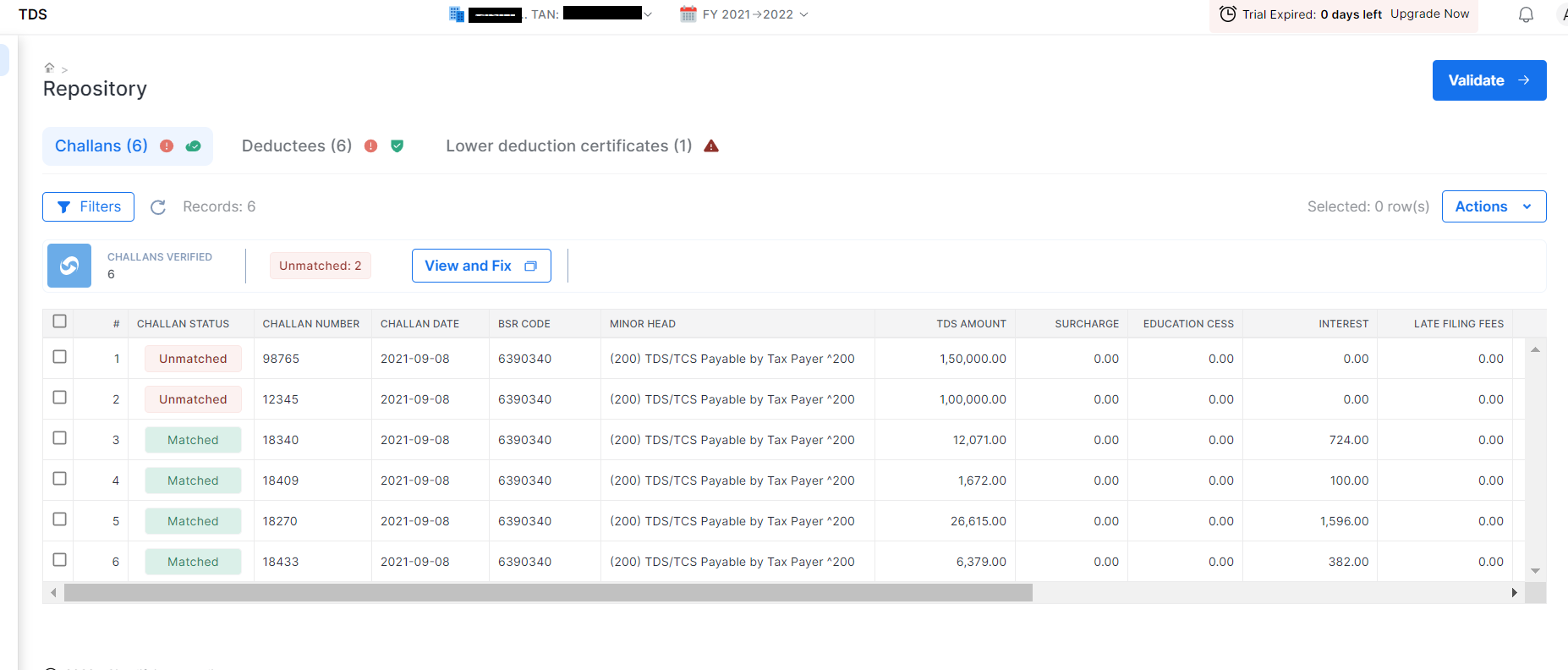
# Repository
You can see and validate all the master list of deductees, challans and LDC’s (lower deduction certificate) for the whole financial year for that particular deductor. You will go to the section titled ‘**Repository**’ on the dashboard
Steps to guide:
1. You will choose the section titled ‘Repository’ on the dashboard
2. Choose “Deductor”
3. Choose Financial Year
4. Click on Proceed
{% hint style="info" %}
In this dashboard you can see three sections: “Challan”, “Deductees” , and “Lower deduction certificates”. In all these respective sections you can see the following status
{% endhint %}
**Challan** - Match or unmatch status and remaining balance in each challan
**Deductees**- PAN status- Active or Invalid, 206AB status, Aadhar linking status, Name Match status with TRACES and Type of deductor. If person don’t have PAN their country, emailID, contact no, Address in country, TIN etc
**Lower deduction certificates**- Certificate status- Active or Invalid, certificate no.,validity, Section code, Nature of payment, validity, amount limit, amount consumed as per TRACES amount and consumed as per clear.
{% hint style="info" %}
You can do the following activities under the Repository Section.
1. You can validate the data like challans, PAN or LDC by clicking on tab “Validate”
2. You can download the report as well in excel through “Action” tab
3. You can add the row or delete the row as well. For deleting a row you have to click on a small box then go to the action tab and then click on “Delete” row”.
Note: A row can be deleted only when required data is not in the return
{% endhint %}
.