# Get started with ClearMax ITC
## **Onboarding**
### **1. How is Max ITC going to help you?**
Max ITC will help your business in
* Marking your ITC journey on autopilot by seamlessly reconciling documents & avoiding any manual intervention & tracking invoices at every state.
* Recovering pending ITC from vendors by two-way vendor communication and automatic vendor payment blocking using vendor whitelisting and blacklisting.
* Filing entire GSTR 3B basis actions taken on Max ITC.
* Providing ready insights on CFO dashboard for your leadership.
### **2. What are the steps to onboard in the system?**
Please follow the below steps to onboard in the system of Max ITC :
* Ingest your Purchase Register (PR) by selecting the template of your choice and the return period.
Please find below the screenshots that will help you better understand the onboarding process:
### Step 1: Welcome screen to get started.

### Step 2 : Enter GSTIN credentials.
Add a GSTIN that you wish to onboard with.
.png?alt=media\&token=d1d080ba-7c03-46c4-b519-b3abec874b96)
### Step 3 : Authorizing GSTIN credentials by entering OTP.
Authorize your GSTIN by entering relevant credentials and authorizing it by entering OTP.
.png?alt=media\&token=322c44eb-d4e1-4f1d-8319-1571fbc627b1)
### Step 4 : Fetch 2A data from GSTN by selecting the relevant return period.
Confirm the return period for which data has to be downloaded and reconciliation has to be run.
Upload your Purchase Register using CT Template provided. Correct any errors that might be in the ingested file & reupload corrected file.
.png?alt=media\&token=8fa64162-83c2-4ad1-9d7d-004a4838c55b)
## Maintenance
### Regular OTP Activation
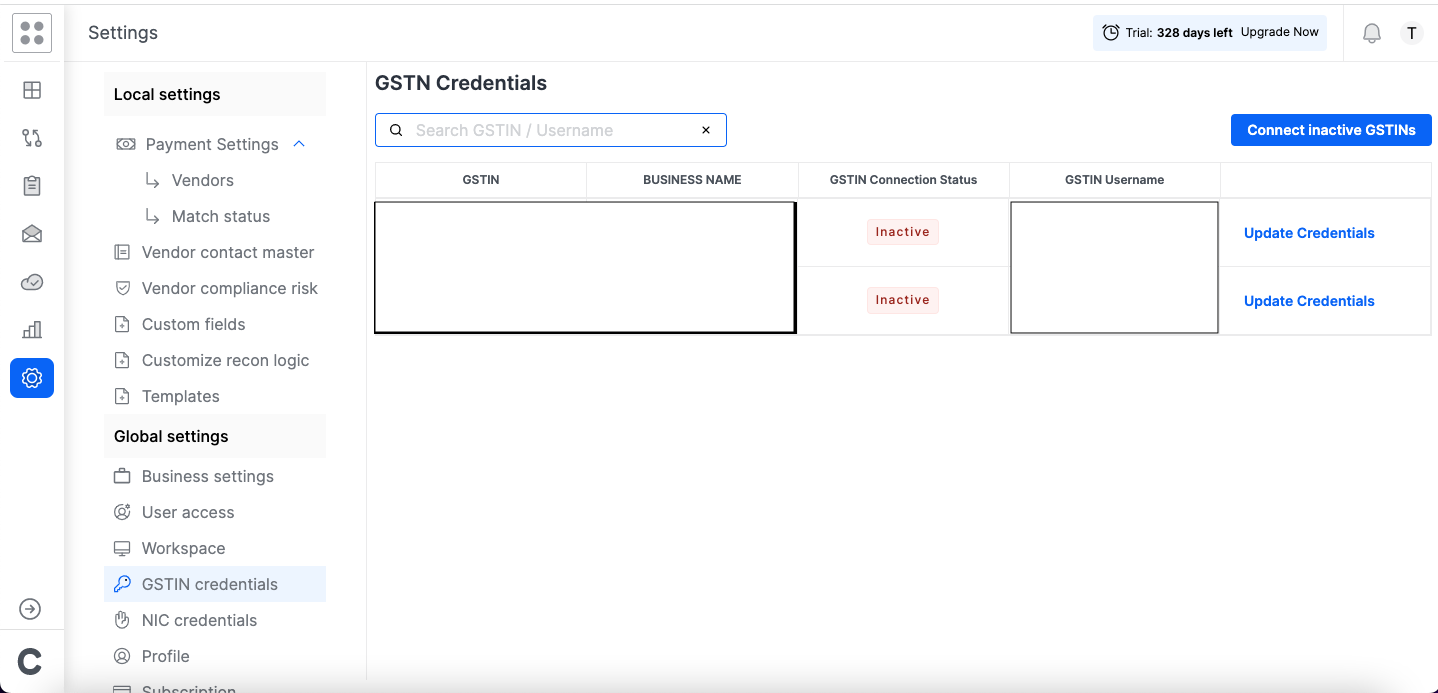
Your monthly activity of activating GSTINs one-by-one and entering OTPs can be quickly completed with a single-click to activate all you GSTINs
Steps:
1. Set up an auto-forward rule from your registered email address to send all the OTPs to a mailbox provided by Clear
2. Go to Settings --> Global Settings --> GSTIN Credentials and click on "Connect inactive GSTINs"
3. Clear Financial Cloud will read the OTPs received through the auto-forward and activate all your OTPs in 10 mins
.png?alt=media&token=883311ab-06e8-4dc1-b88b-5908f6a948e7)